Search Tips and Tricks
Overview
The search functionality allows users to efficiently filter and locate specific entries across various lists, including:
- Mobile Assets
- Sites
- Systems
- System Profiles
- Accounts
- Audit (authentication attempts)
Searches can target all associated properties, whether or not they are displayed in the list view. This flexibility is enhanced by support for case-insensitive searches, partial-text queries, Boolean operators, parameter-based searches, and custom extensions.
While wildcards are not supported, the wide range of search methods ensures precise and efficient filtering.
API: Search Mobile Assets ·
Search Sites ·
Search Accounts
Search Examples
General Search Techniques
The following table outlines common search techniques applicable across multiple domains:
| Search Type |
Description |
Example |
| Full Text |
Use full text to focus on specific values. To eliminate partial matches, use single quotes. |
'823' finds 823 but not 8234. |
| Partial Text |
Use a minimum of 3 characters to find matches containing the input string. |
andr finds all Android devices. |
| Boolean |
Use Boolean operators (AND, OR, NOT) to refine searches. |
andr AND Canada finds all Android devices in Canada. |
| Parameters |
Search for a specific parameter value with or without single quotes. |
ICCID=89123 finds Mobile Assets containing 89123; 'ICCID=8912312312312312312' finds exact matches. |
| Extensions |
Custom parameters can be used to tag objects and search accordingly. |
user=joe finds Mobile Assets tagged with the user value Joe (and Joey unless quoted). |
| Sessions |
Search by session state. |
open finds active sessions; closed finds disconnected sessions. |
Domain-Specific Searches
Mobile Assets
| Field |
Description |
Example |
| ID |
The numerical suffix of an API endpoint URI for a Mobile Asset. |
id=222228100 |
| IMSI |
Search by International Mobile Subscriber Identity. |
imsi=310150123456789 |
| Status |
Filter by Mobile Asset state. Supported states: Connected, Disconnected, Provisioned, Error. |
status=connected |
| System |
Search by the name of the System associated with the Mobile Asset. |
system=MainNetwork |
| Customer |
Search by the Customer associated with the Mobile Asset. |
customer=AcmeCorp |
| Location |
Search by city name. |
location=chicago |
| Country |
Search by country code or name. |
country=ca or country=canada |
| IMEI |
Search by the device’s International Mobile Equipment Identity. |
imei=123456789012345 |
Sites
| Field |
Description |
Example |
| ID |
The numerical suffix of an API endpoint URI for a Site. |
id=333338900 |
| Customer |
Search by Customer associated with the Site. |
customer=AcmeCorp |
Systems
| Field |
Description |
Example |
| ID |
The numerical suffix of an API endpoint URI for a System. |
id=444449700 |
| Customer |
Search by Customer associated with the System. |
customer=AcmeCorp |
Accounts
| Field |
Description |
Example |
| Email |
Search by the account’s email address. |
email=user@example.com |
| External ID |
Search by the alternate ID assigned to the account. Bare terms match it too. |
externalId=EMP-4471 |
| Customer |
Search by the Customer associated with the account. |
customer=AcmeCorp |
| Last Login Before |
Find accounts with no successful sign-in since the given date, including accounts that have never signed in. The date must be in YYYY-MM-DD form and is evaluated as midnight UTC. |
lastLoginBefore=2025-01-10 |
Audit
The Audit log records authentication attempts. Its search covers every recorded attempt, not only the rows on screen.
| Field |
Description |
Example |
| Email |
Search by the email address on the attempt. |
email=user@example.com |
| IP |
Search by the IP origin of the attempt. |
ip=192.0.2 |
| Type |
Filter by outcome: success, failure, or unknown. failed and error are synonyms of failure. |
type=failure |
| Account |
Restrict results to one account, by account ID. |
account=123271682 |
| Customer |
Search by the Customer that owns the account. |
customer=AcmeCorp |
Sessions
| Field |
Description |
Example |
| Open |
Find all currently active sessions. |
status=open |
| Closed |
Find all disconnected sessions. |
status=closed |
Extensions
| Field |
Description |
Example |
| **Custom Tags ** |
Search for objects tagged with specific custom parameters. For example, search for user=joe to find assets tagged with joe. |
user=joe |
Additional Notes
- Searching by location or country includes both the device location (if available) and carrier details.
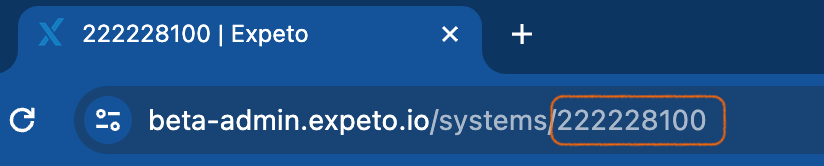
- To find an object’s ID (e.g., Mobile Asset or System), navigate to the object’s details, copy the URI, and extract the numerical identifier.
Example:
id=222228100