Expeto Platform Sizing Technical Guide⚓︎
Introduction⚓︎
This document outlines the compute and storage requirements for Expeto products running in a Kubernetes deployment environment.
Platform Components Overview⚓︎
The Expeto platform consists of several key components that work together to deliver network services:
xCore / xRouter⚓︎
- Built to scale horizontally based on data throughput capacity needs
- Configurable redundancy from none to full geographic redundancy
- xRouter deployment:
- Typically hosted centrally by the network operator
- Geo-redundant deployments available for High Availability, Data Sovereignty, or low latency localization
- xCore deployment:
- Typically hosted by the end customer
- Flexible deployment model with one to many xCores to match specific use cases
xControl / xView⚓︎
- Deployment model:
- Typically deployed centrally by the network operator
- Geo-redundant deployments available for High Availability
- Scaling:
- Built to scale vertically depending on node specifications
- Sized according to required active subscribers
- Redundancy options:
- Single site with failover capability
- Full geographic redundancy
All platform components are deployed in Kubernetes Clusters for consistent management and orchestration.
Kubernetes Infrastructure⚓︎
Key Definitions⚓︎
Node: A physical or virtual machine with defined capacity to run Kubernetes workloads
Cluster: A group of nodes working together to run an Expeto Component in a single geographic location
Redundancy: Each cluster contains 2+ nodes to provide service continuity, ideally 3+ nodes depending on Kubernetes environment.
Geographic Redundancy: Utilizes 2+ cluster locations, each with 2+ nodes, for multi-site resilience, ideally 3+ nodes depending on Kubernetes environment.
Assumptions:⚓︎
- The underlying infrastructure is composed of Kubernetes nodes running either on bare metal or on virtual machines with a modern Linux kernel (recommended versions 5.13+), or using AKS, GKS, EKS, or Digital Ocean hosted Kubernetes offerings.
- The same nodes can be used for both the control plane and the worker nodes though for production systems it is strongly recommended to use separate nodes. At minimum, 3 nodes are always needed to guarantee redundancy and availability for both control-plane and worker nodes.
- Expeto is not recommending the size, specification, or number of the underlying physical servers, only the resources allocated to the Kubernetes nodes required to run the Expeto components. A compute partner may recommend the physical server and network switch designs.
- This design is for a single cluster deployment at a co-location or cloud provider running on x86_64 (amd64) based processors and does not take into consideration geographic or other types of ‘failover’. It is not recommended to have clusters spanning multiple geographically separated co-locations or geographic regions.
- High Availability (HA) is achieved using multiple clusters in an active-active setup.
- The choice of hypervisors/operating systems for nodes, and their maintenance and support, is left to the discretion of the operations team as per best practices.
Node-selectors, tolerations, and affinity⚓︎
Workloads can be associated and restricted to specific nodes but special care must be taken to prevent single points of failure or compromise performance or load balancing.
The simplest way to associate a workload with a specific node is to use node-selectors in combination with labels. This allows pods from a specific workload to be assigned to dedicated nodes which can be either VMs or bare metal. This is generally only recommended when physical constraints are in place because of network interface cards or other infrastructure components.
Affinities are more powerful and flexible than node-selectors and allow “soft” preferences. These soft preferences allow failover to other nodes and the ability to choose if pods should move back when a node does come back. Anti-affinities are also supported and can be used to achieve redundancy without restricting load-balancing.
Taints and tolerations are the most powerful but also the most complex. They allow advanced scheduling logic to be written to the exact specifications and requirements of the hardware and customer.
These topics should be familiar to most experienced Kubernetes administrators and as such will not be covered in more detail here but for more information see: - Assign Pods to Nodes - Taint and Toleration
Node Configuration and Performance Considerations⚓︎
For best performance and resource utilization, configuration changes should be made to the underlying hardware and host operating systems. This includes but is not limited to changing kernel settings and parameters, network interface settings and queue lengths, NIC drivers, and settings.
These settings and modules are configured automatically by MachineConfigs or DaemonSets but can be configured manually if desired.
Supported Kubernetes Container Platforms⚓︎
- VMware Tanzu
- RedHat OpenShift/MicroShift
- MicroK8s
- EKS
- AKS*
- GKE*
- Digital Ocean Kubernetes*
* Some hosted Kubernetes platforms have limitations on performance and networking configurations that should be considered.
xCore / xRouter Scaling⚓︎
Key Assumptions:⚓︎
- Default size descriptions are for production deployments using built-in Kubernetes networking.
- VPP/DPDK/SR-IOV networking functionality can be enabled for substantially better networking performance.
- Capacity limits are estimated based on typical deployments. Actual limits depend on traffic model of end customers
- A k8s node can be deployed bare metal or on a VM. For redundancy, multiple VMs should always be distributed on as many physical servers as specified.
- HA Sizing recommendations assume an active-active configuration.
- Unless otherwise specified, CPU/Core count refers to physical cores and not hyperthreaded vCPUs.
- All disks should be enterprise SSD storage in a redundant setup, made available as PersistentVolumes via PersistentVolumeClaims from any node in the cluster with ReadWriteOnce access.
Sizing Methodology⚓︎
-
Determine redundancy requirements (cluster size)
- 1 node – no redundancy (total capacity = 1 node)
- 2 nodes – failover redundancy (total capacity = 1 node, MicroK8s only)
- 3+ nodes – horizontal scalable redundancy (total capacity = n nodes - 1)
- Geographic requires 2+ clusters (total capacity = n clusters - 1)
-
Select scale per node
- 4 CPU / 32 GB – up to 2 Gbps or 50,000 subscribers
- 4 CPU / 64 GB with VPP/DPDK/SR-IOV – up to 10 Gbps or 250,000 subscribers
- 8 CPU / 64 GB – up to 4 Gbps or 100,000 subscribers
- 8 CPU / 96 GB with VPP/DPDK/SR-IOV – up to 20 Gbps or 500,000 subscribers
-
Build clusters based on capacity requirements
Storage Requirements⚓︎
Disk per cluster: 100GB per 2 Gbps capacity
Example Configurations⚓︎
2 Gbps (No Redundancy):⚓︎
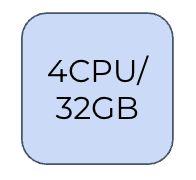
- Single node: 4 CPU / 32 GB
- 100 GB Disk Storage
2 Gbps (With Redundancy):⚓︎
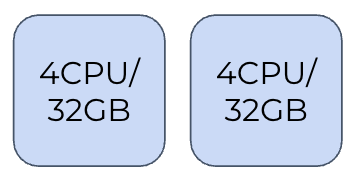
- Two nodes: 4 CPU / 32 GB each
- 200 GB Disk Storage
6 Gbps (Scalable Redundant):⚓︎
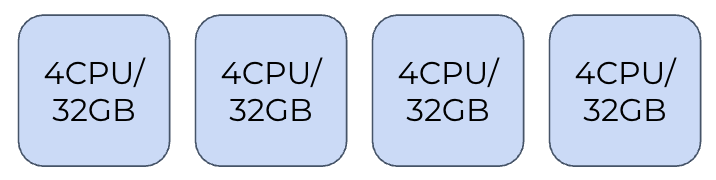
- Four nodes: 4 CPU / 32 GB each
- 300 GB Disk Storage
12 Gbps (Scalable Redundant):⚓︎
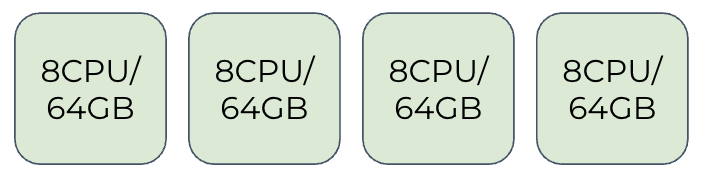
- Four nodes: 8 CPU / 64 GB each
- 600 GB Disk Storage
- Higher capacity per node for increased throughput
xControl / xView Scaling⚓︎
Key Assumptions:⚓︎
- Capacity limits are estimated based on typical deployments. Actual limits depend on traffic model of end customers
- A k8s node can be deployed bare metal or on a VM. For redundancy, multiple VMs should always be distributed on as many physical servers as specified.
- HA Sizing recommendations assume the use of an active-active configuration.
- Unless otherwise specified, CPU/Core count refers to physical cores and not hyperthreaded vCPUs.
- All disks should be enterprise SSD storage in a redundant setup, made available as PersistentVolumes via PersistentVolumeClaims from any node in the cluster with ReadWriteOnce access.
Sizing Methodology⚓︎
-
Determine redundancy requirements (cluster size)
- Single Location (2+ nodes)
- Geographic failover (2 clusters)
-
Scale per node
- 4 CPU / 32 GB – up to 100,000 subscribers
- 8 CPU / 64 GB – up to 500,000 subscribers
- 16 CPU / 128 GB – up to 1,000,000 subscribers
-
Build clusters based on capacity requirements
Storage Requirements⚓︎
Disk requirements per cluster:
- 100K subscribers = 1 TB
- 500K subscribers = 4 TB
- 1M subscribers = 8 TB
Example Configurations⚓︎
100,000 Subscribers:⚓︎
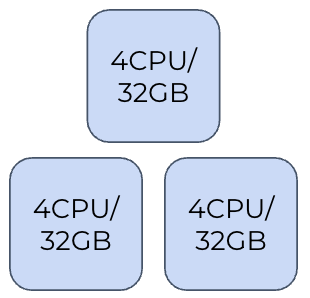
- Three nodes: 4 CPU / 32 GB each
- 1 TB Disk Storage
500,000 Subscribers:⚓︎
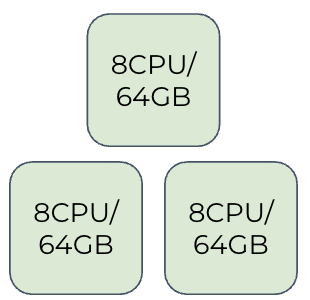
- Three nodes: 8 CPU / 64 GB each
- 4 TB Disk Storage
1,000,000 Subscribers with Geographic Failover:⚓︎
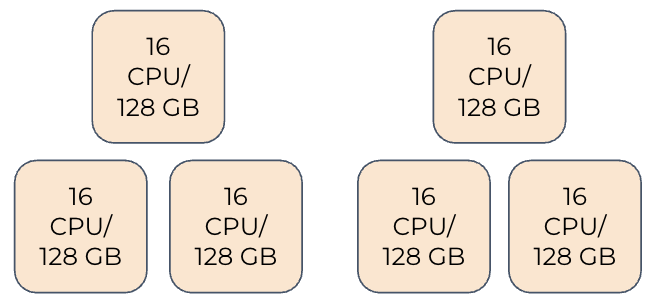
- Location A: Three nodes of 16 CPU / 128 GB each
- Location B: Three nodes of 16 CPU / 128 GB each
- Provides complete geographic redundancy
- 8 TB Disk Storage
Conclusion⚓︎
This technical guide provides the foundation for properly sizing an Expeto platform deployment. When planning your implementation, consider:
- Expected throughput requirements (in Gbps)
- Number of subscribers to support
- Redundancy needs (local and/or geographic)
- Growth projections to ensure adequate scaling capacity
For specific sizing recommendations tailored to your environment, consult with Expeto technical specialists.