
Expeto xCore⚓︎
Expeto xCore is a hybrid combined 3/4/5G core that can be installed and configured for both private and public use-cases.
If IPX connectivity is required please see xRouter documentation.
xCore is distributed and installed and configured using Helm charts and Kubernetes.
As a fully containerized 3GPP compliant core xCore is optimised for for ease of deployment into enterprise-controlled cloud or edge locations, supporting connection to both public and private networks.
Expeto xCore exists in two configurations: private and public.
The private RAN implementation of Expeto xCore is a complete 3GPP compliant Packet Core providing private networking over a 4G/5G Mobile Network. It includes fundamental 3GPP E UTRAN components such as the HSS/AUSF/UDR/UDM AMF/MME, SGW/SMF, and UPF/PGW. These components are fully compliant with 3GPP specification standards. The private Expeto xCore is always installed within the private network. The public RAN implementation of Expeto xCore provides added external to an existing private 5G/LTE installation.
Installed outside the private network in a data center or corporate headquarters, public Expeto xCore and the Expeto xRouter service enable private SIM devices connected over a public network to access the enterprise 5g/LTE network. Tasks such as subscriber authentication are performed before access to the private network is granted.
4G/LTE/5G Expeto xCore services:⚓︎
- HSS/AUSF/UDR/UDM – Store subscriber information for authentication and authorisation. Stores all the information about provisioned IMSIs
- SGW/SMF – Performs routing responsibilities as a GTP-Proxy and/or delegates them to UPF instances
- PGW/UPF – Routes inbound and outbound packets through the enterprise network for defined CIDR ranges
- MME/AMF – Control plane for radio access. Connects eNodeBs/gNodeBs and authenticates devices. Manages/stores UE contexts, creates temporary IDs, sends pages, controls authentication functions, and selects the SGW/SMF and PGW/UPFs
Expeto Agent⚓︎
Expeto xCore includes the Expeto Agent which connects to Expeto xControl. The agent monitors changes and synchronizes configuration. Network changes made through xControl are handled by the Agent and automatically propagated to distributed locations using an “outbound only” traffic connection to xControl. The Agent communicates with xControl by connecting using TLS on port 443. If the Agent is disconnected, changes are queued in xControl and sent when the Agent reconnects.
Private Network Scenarios⚓︎
Adopted by industries that rely on secure mission-critical low latency wireless connectivity, private 4G/5G networks provide improved security, low-latency data transfer, network reliability, and cost effectiveness. In a private mobile network scenario, enterprise data is secured within the Enterprise network. The Enterprise itself becomes the mobile network provider, segmenting networks into subnets, managing subscribers, and monitoring network performance. Data in a 4/5G private network is routed through private Radio Access Network (RAN) physically installed at key locations providing site coverage and speed superior to Wi-Fi networks. The site itself can be a factory, hospital, mining location, university campus, airport, shipyard, or anywhere that can benefit from having its own secure 4G/5G network.
Private Network Characteristics:⚓︎
- SIM card or eSIM is added to devices which connect to the private network through the eNodeB/gGodeB RAN.
- The Enterprise network can be segmented using Systems, each system can egress to a separate subnet with it's own CIDR range.
- Each geographically remote site requires an additional instance of Expeto xCore.
- Does not require use of the Expeto xRouter service.
Default Encryption Settings:⚓︎
- 3GPP Cipher and integrity settings 33.501 (5.11.1)
- Ciphering Value "0001" 128-NEA1 128-bit SNOW 3G based algorithm
- Integrity Value "0001" 128-NIA1 128-bit SNOW 3G based algorithm
How To Build This Network⚓︎
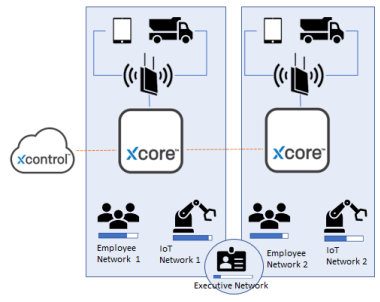
There are several ways to set up a Network spanning physical sites depending on your requirements and any existing network, the following describes an example use-case.
Network Configuration:⚓︎
- Each instance of Expeto xCore corresponds to a Site in Expeto xControl.
- Two Systems are defined for each site: Employee Network and IoT Network.
- The Executive Network System is a single Shared System assigned to both Sites. This provides executives with roaming access when visiting the other site location.
- Each System is assigned a unique CIDR range for mobile devices, each system is associated with a separate network interface on the xCore cluster (vlan/macvlan/ipvlan/vpn/vpc)
- Each private SIM card in a device is a Subscriber, known to the network by the IMSI number.
- Each Subscriber is assigned to one of the Systems.
Managing Subscribers by Systems⚓︎
Systems represent subnets, logical divisions of your network to which you can apply policies and assign groups and subscribers. The bar in the diagrams illustrate the number of Subscribers assigned to the System and the capacity of the System. The capacity of the System is defined by the associated CIDR range of available IP addresses. Although Sites are at different physical locations, Systems can be logically assigned to one or more network Sites. This allows Subscribers assigned to a shared System roaming access to multiple Sites. In the previous use case, if all Systems are assigned to both Sites, roaming of all Subscribers is allowed. Any employee (or autonomous vehicle!) of Site 1 could drive to Site 2 and still access the network. To restrict access to a single location, create Systems that are exclusive to a single Site . To allow access to multiple locations (enable roaming), create Systems that are assigned to multiple sites.
In the following example, the following Systems are created:
- Employee Network 1 and IoT Network 1 are Systems assigned to Site 1.
- Employee Network 2 and IoT Network 2 are Systems assigned to Site 2.
- Executive Network is a Shared System assigned to Site 1 and Site 2.
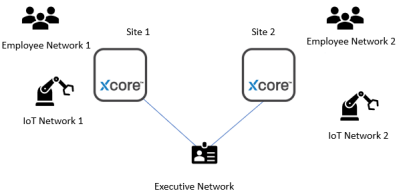
Each Subscriber is assigned to a single System only. Subscribers can either have dynamic or static IP addresse, dynamic addreses are allocated from a system wide CIDR block. If a Subscriber does not have a static IP address and is moved between Systems the Subscriber loses the old IP address and is given a new one that falls within the CIDR block of the new System. If the Subscriber has been assigned a static IP address, the IP address does not change. An Admin can assign a static IP address to a Subscriber in Expeto xControl by using an Extension. The diagram also shows the mixture of a public and private network. The public/private scenario is examined in the next section.
Public and Private (Hybrid) Network Scenario⚓︎
The public and private network scenario adds the ability for user equipment (phones, tablets, IoT devices) to connect to the private network over a public mobile network. For example, employees can leave a remote Site, even leave the country, but can still use their phones with private SIM cards to access the private network. The public and private connections are managed as a single network through Expeto xControl. The scenario comprises a mixture of public and private RAN connectivity provided by two instances of Expeto xCore (one public, one private), and Expeto xRouter. Expand the network by deploying additional private Expeto xCores at each remote location. Improve global coverage by deploying additional public Expeto xCores at globally dispersed data centers.
Network Scenario Characteristics:⚓︎
- Private SIM cards in all devices provide global access to the private network
- Roaming between public and private mobile networks with the same SIM
- Private deployment of Expeto xCore runs in a Kubernetes cluster on the private site
- Public deployment of Expeto xCore runs in a Kubernetes cluster in a datacenter or corporate headquarters
- Expeto xRouter runs in a datacenter with connectivity to IPX network and routes traffic between public mobile network operators and xCores
- Expeto xControl manages public/private as a single network
- Each geographically remote private network Site requires an additional instance of Expeto xCore
- Secure data transfer throughout the network with the ability to establish data sovereignty
- The Enterprise network can be segmented into subnets by assigning a CIDR range to a specific network associated with a System
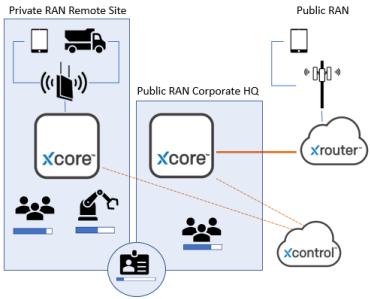
Scenario Details Control Plane (Public RAN) * Private SIM attaches to the public RAN Mobile Network Operator (MNO) network. * The MNO directs SIMs using the Private IMSI range to the Expeto xRouter * In the Expeto xRouter, an Expeto HSS/UDM authenticates the SIM (Public RAN) * Expeto xRouter PGW/UPF receives data from the public RAN MNO network and sends it to the public Expeto xCore PGW/UPF network slice based on the subscriber’s system membership through an private link or VPN. * Private Expeto xCore SGW/SMF routes the data to the selected PGW/UPF network slice based on the subscriber’s system membership.
Control Plane (Private RAN)⚓︎
- SIM attaches to private RAN.
- Expeto xCore with local MME/AMF and HSS/AUSF/UDR/UDM installed manages authentication and authorization.
Data Plane (Private RAN)⚓︎
- Data is routed to the PGW/UPF network slice based on the subscriber’s system membership in the Expeto xCore located in the remote site.
- Expeto xCore has PGW/UPF instances for each subnet in the Enterprise site.
4G/5G Throughput⚓︎
Throughput depends on the following factors: * Bandwidth -- The wider the bandwidth, the higher the throughput. 4G/LTE Channel bandwidth can be 1.4, 3, 5, 10, 15, or 20 MHz. 5G Channel bandwidth adds 40, 80 and 160Mhz and channel multiplexing. * Conditions -- The eNodeB/gNodeB selects Modulation and Coding Scheme (MCS) based on the current channel quality for radio conditions. The higher MCS, the more bits can be transmitted by a single resource element (RE). * Multi-Antenna Use -- MIMO 2x2 or MIMO 4x4 can be used to increase performance by providing additional data streams. The bits per RE multiplied by the number of streams provide the throughput. Actual throughput will be slightly lower due to the additional pilot signals. * Network Load -- Resources are divided amongst active subscribers. * Bandwidth of 20MHz with the best modulation (256QAM) without MIMO (SIMO) provides a maximum throughput of 97.896 Mbps. For more bandwidh larger channels can be used or more channels added with multiplexing.
5G MMWave Throughput⚓︎
In addition to considerations for LTE/4G throughput 5G adds more spectrum, this is especially true in the millimeter wave frequencies where throughput can reach multy-gigabit speeds. 5G connections also allow more flexibility when it comes to combined attach and using multiple parts of the spectrum together.