Search Tips and Tricks
Overview
The search functionality allows users to efficiently filter and locate specific entries across various lists, including:
- Mobile Assets
- Sites
- Systems
- System Profiles
- Accounts
Searches can target all associated properties, whether or not they are displayed in the list view. This flexibility is enhanced by support for case-insensitive searches, partial-text queries, Boolean operators, parameter-based searches, and custom extensions.
While wildcards are not supported, the wide range of search methods ensures precise and efficient filtering.
Search Examples
General Search Techniques
The following table outlines common search techniques applicable across multiple domains:
| Search Type |
Description |
Example |
| Full Text |
Use full text to focus on specific values. To eliminate partial matches, use single quotes. |
'823' finds 823 but not 8234. |
| Partial Text |
Use a minimum of 3 characters to find matches containing the input string. |
andr finds all Android devices. |
| Boolean |
Use Boolean operators (AND, OR, NOT) to refine searches. |
andr AND Canada finds all Android devices in Canada. |
| Parameters |
Search for a specific parameter value with or without single quotes. |
ICCID=89123 finds Mobile Assets containing 89123; 'ICCID=8912312312312312312' finds exact matches. |
| Extensions |
Custom parameters can be used to tag objects and search accordingly. |
user=joe finds Mobile Assets tagged with the user value Joe (and Joey unless quoted). |
| Sessions |
Search by session state. |
open finds active sessions; closed finds disconnected sessions. |
Domain-Specific Searches
Mobile Assets
| Field |
Description |
Example |
| ID |
The numerical suffix of an API endpoint URI for a Mobile Asset. |
id=222228100 |
| IMSI |
Search by International Mobile Subscriber Identity. |
imsi=310150123456789 |
| Status |
Filter by Mobile Asset state. Supported states: Connected, Disconnected, Provisioned, Error. |
status=connected |
| System |
Search by the name of the System associated with the Mobile Asset. |
system=MainNetwork |
| Customer |
Search by the Customer associated with the Mobile Asset. |
customer=EnterpriseCorp |
| Location |
Search by city name. |
location=chicago |
| Country |
Search by country code or name. |
country=ca or country=canada |
| IMEI |
Search by the device’s International Mobile Equipment Identity. |
imei=123456789012345 |
Sites
| Field |
Description |
Example |
| ID |
The numerical suffix of an API endpoint URI for a Site. |
id=333338900 |
| Customer |
Search by Customer associated with the Site. |
customer=SiteManagerCorp |
Systems
| Field |
Description |
Example |
| ID |
The numerical suffix of an API endpoint URI for a System. |
id=444449700 |
| Customer |
Search by Customer associated with the System. |
customer=SystemAdminCorp |
Accounts
| Field |
Description |
Example |
| Email |
Search by the account’s email address. |
email=user@example.com |
| Customer |
Search by the Customer associated with the account. |
customer=AccountCorp |
Sessions
| Field |
Description |
Example |
| Open |
Find all currently active sessions. |
status=open |
| Closed |
Find all disconnected sessions. |
status=closed |
Extensions
| Field |
Description |
Example |
| **Custom Tags ** |
Search for objects tagged with specific custom parameters. For example, search for user=joe to find assets tagged with joe. |
user=joe |
Additional Notes
- Searching by location or country includes both the device location (if available) and carrier details.
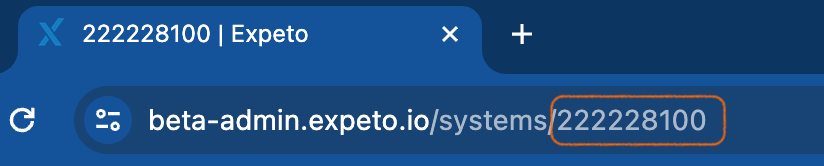
- To find an object’s ID (e.g., Mobile Asset or System), navigate to the object’s details, copy the URI, and extract the numerical identifier.
Example:
id=222228100