Sites⚓︎

A Site represents a deployed instance of the Expeto xCore, which can be installed either on-premise or as a virtual instance. Sites are the foundation for managing networked systems and devices, providing centralized control, monitoring, and configuration of Expeto-enabled private mobile networks. Each Site serves as a gateway for managing Systems, Mobile Assets, and network policies.
Note
For SaaS-hosted xControl instances, contact Expeto Support to add or remove Sites.
Site Status⚓︎
Navigate to the Sites section to view a list of all Sites available in your network. Each Site’s status is displayed as either Connected or Disconnected:
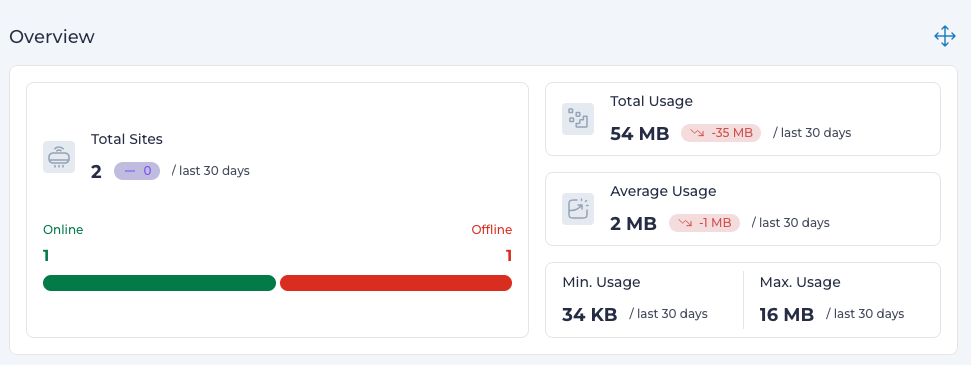
- A Site is marked as Offline if it has not been detected by network agents for 5 minutes.
-
Additional information available for each Site includes:
- Network Topology: The network configuration of connected assets.
- Data Metrics: Bandwidth usage statistics (total, average, min, max)
Site Details⚓︎
Click the name of a Site in the Sites list to view detailed information about the Site. The following parameters are displayed:
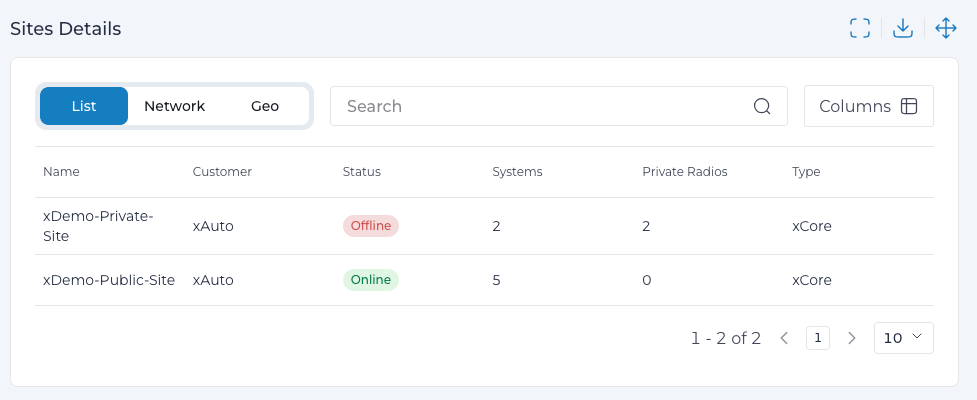
| Column Name | Description |
|---|---|
| Name | Identifies the Site in the GUI. Maximum 64 characters. |
| Location | Optional geographic information about the Site. |
| UUID | An autogenerated unique identifier for the Site in hexadecimal format. |
| Agent Version | The version of the Expeto Agent running on the Site (e.g., 1.1.6730). |
| IP Address | The IP address of a Connected Site. |
| Last Seen | The timestamp indicating when the Site was last connected. |
| Extensions | Custom key-value pair parameters configured for the Site. |
Additional options available:
Overview Metrics, Network Topology, Geographical Location (if configured), Associated Systems, Associated Private Radios, Data Usage History.
Common Site Scenarios⚓︎
Sites can be configured in various ways depending on network requirements. The following scenarios illustrate typical single-Site and dual-Site installations, highlighting their features and potential use cases.
Single-Site Scenario⚓︎
The graphic below demonstrates a single-Site deployment with one System:
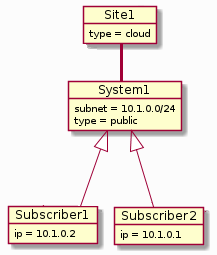
Key Features:
- Each Subscriber can be assigned a static IP address from the System's subnet.
- All Subscribers access the same network, but individual network policies can be applied.
Example
One Subscriber could be assigned a System Profile with higher data throughput.
Adding an additional System within the same Site enables network segmentation, as shown in the diagram below:
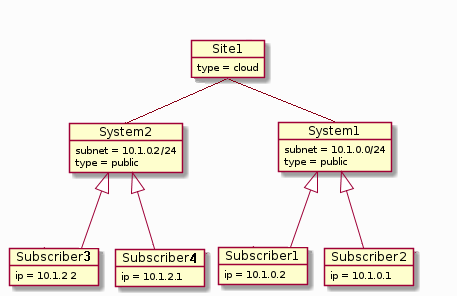
- Network Segmentation: Allows restrictions on Subscribers to specific parts of the network.
- Policies can now be enforced at the System level, providing more granular control.
Dual-Site Scenario⚓︎
A dual-Site setup enables segmentation of a network across two locations. The diagram below demonstrates this configuration, featuring one shared System and two Site-specific Systems:
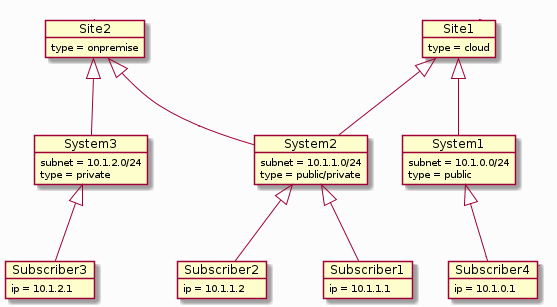
Key Characteristics:
- One Site is on-premise, while the other is virtual.
- Each System is assigned a unique subnet for clear traffic separation.
- Subscribers assigned to the shared System (System2) can roam seamlessly between the two Sites.
- Subscribers assigned to System1 and System3 are restricted to Site1 and Site2, respectively.
Example Use Case: Industrial Manufacturing⚓︎
This dual-Site setup is ideal for industrial environments with distinct operational needs:
-
Site1 (Cloud-based Instance):
- Hosts an IT Operations network (System1) for office computers and printers connected via the Internet.
-
Site2 (On-premise Instance):
- Contains a dedicated SCADA network (System3) installed behind a corporate firewall.
- Operates as a private, low-trust or zero-trust network with no Internet access.
- Robotic devices within this network are assigned static IP addresses.
Employees requiring access to both the SCADA network and the IT Operations network have their devices registered with the shared System (System2), enabling seamless communication across both Sites.
Note
The two Sites in this scenario could also be both on-premise, deployed in different geographic locations.