Session Details⚓︎
This document provides a guide for examining session and SMS event logs for Mobile Assets in Expeto xControl. Event logs allow administrators to monitor and analyze the network activity and communication history of Mobile Assets, offering insights into both subscription (control plane) and data (user plane) sessions, as well as SMS messaging details.
Session event logs include timestamped records of subscription and data session events, categorized by types such as HSS (control plane) and PGW (user plane). Administrators can review session states, network operator interactions, and manual changes like airplane mode activations. SMS event logs track the origin, status, and potential failure causes of text messages sent by or to Mobile Assets, with details about the source types and specific error codes for failed delivery attempts. These tools enable effective troubleshooting and network management.
Session Event Log⚓︎
The Event Logs panel on the Mobile Asset page provides details about session activity, including the Mobile Asset’s current state, last-seen timestamp, and assigned IP address. For public/private sites, the associated xRouter site (e.g., "AWS") is also displayed.
View Session Event Logs⚓︎
To access the Session Event Log for a Mobile Asset:
- Navigate to Mobile Assets.
- Click the IMSI of the Mobile Asset. The Mobile Asset details page will open.
- In the Event Log section, click Session.
The session history panel displays events in reverse chronological order, including details such as country, network operator, IMSI and IMEI values, system and site names, and more.
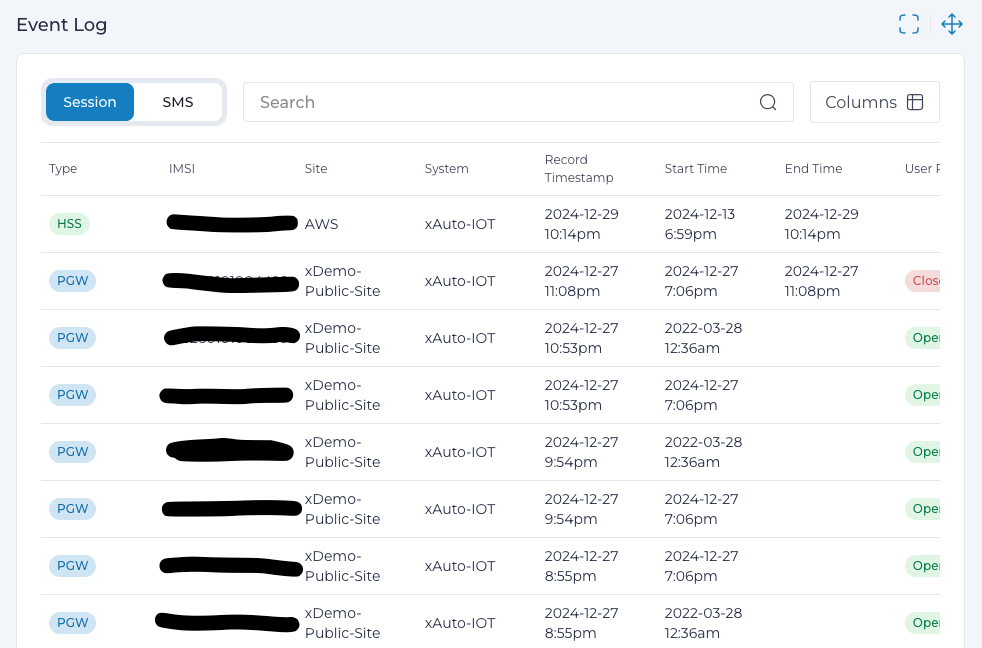
Customize Columns⚓︎
To modify the displayed columns:
- Click the Column Chooser
 icon.
icon. - Check or uncheck columns to add or remove them from the view.
Note
Hover over a column name in the list for a brief description of its content.
Key Information in Session Logs⚓︎
- Timestamp: Indicates when the event occurred, session start time, and if applicable, session end time.
- Entry Type: Specifies whether the event is related to the HSS (control plane) or PGW (user plane).
Session events typically result from network interactions, such as keep-alive pings between the network operator and the Mobile Asset. Manual changes, like placing a device in airplane mode, are also captured.
Entry Type - HSS⚓︎
HSS (Home Subscriber Server) type entries record the subscription (control plane) session events of a Mobile Asset. These events pertain to the authentication and management of Mobile Assets as they connect to the network. Mobile Assets in a public/private site connecting through a public network are routed to the xRouter site, where authentication is performed against HSS records.
Subscription Session States⚓︎
The subscription session can transition through the following states:
| State | Description |
|---|---|
| Attached | The Mobile Asset successfully establishes a connection to the network. |
| Deleted | The subscription session is removed, indicating the Mobile Asset is no longer attached. |
| Provisioned | The Mobile Asset's subscription information is configured and ready for use. |
Attach Process Overview⚓︎
When a Mobile Asset (User Equipment or UE) initiates an attach request:
- The HSS authenticates the Mobile Asset using its subscription data.
- Upon successful authentication, the default bearer is established.
- The attach process is completed, and the request is accepted.
- The Mobile Asset is then able to initiate a data session with the Packet Gateway (PGW).
These events ensure that Mobile Assets are authenticated and managed securely, enabling them to access the network while maintaining control over their session states.
Entry Type - PGW⚓︎
PGW (Packet Gateway) entries track data (user plane) session events for Mobile Assets, detailing the state of data sessions.
Data Session States⚓︎
- Open: The data session has started and is currently active.
- Closed: The data session has ended and is no longer active.
Identifying Session States⚓︎
- A session with a Start Time but no End Time is still open.
- A subsequent entry may show an End Time, indicating the session is closed, or confirm the session remains open.
These entries provide critical insights into data session activity, allowing administrators to monitor and manage connectivity effectively.
Examine SMS Log Events⚓︎
To view SMS event log details for a Mobile Asset:
- Navigate to Mobile Assets.
- Click the IMSI of the desired Mobile Asset to open its details page.
- In the Event Log section, click SMS to access the SMS event logs.
Source Types⚓︎
Source types indicate the origination device or application for an SMS message. If the source is MO or MAP, the message is classified as outgoing. The table below explains the various source types:
| Source Type | Description |
|---|---|
| MO | Mobile Originator. |
| CLI | Command Line. |
| MSC | Mobile Switching Center (the SMS Gateway). |
| SMPP | SMPP (Short Message Peer-to-Peer) Gateway. |
| LOCAL | Local device or application. |
| REMOTE | External device or application. |
| MAP | Mobile Application Part Protocol, such as MAP V4. Used to query HLR/HSS for customer location. |
| SOAP | SOAP client. |
| UNKNOWN | Device or application type is not known. |
Failure Causes⚓︎
Failure causes indicate the result of the last attempt to deliver an SMS message. The table below lists common failure causes and their meanings:
| Failure Cause | Description |
|---|---|
| None | No attempt was made to deliver the message. |
| NoMSCResponse | No response from the Mobile Switching Center. |
| NoSuchDest | Target cannot be identified. |
| NoUserResponse | No response from the recipient. |
| NoMemoryOnHandset | Recipient’s handset lacks sufficient memory. |
| Success | Message delivered successfully. |
| CommsFail | Communication failure occurred. |
| NetError | Network error encountered. |
| SMSCCongestion | SMS Center is congested. |
| SMPPDisconnect | Disconnection from the SMPP Gateway. |
| NoSuchSMPPUser | SMPP user cannot be identified. |
| Rejected | Message delivery was rejected. |
| Discarded | Message was discarded without delivery. |
| AbsentSub | Subscriber is not reachable. |
| BusyForMTSMS | Subscriber is busy for MT SMS. |
| IllegalSub | Subscriber credentials are invalid or illegal. |
| IllegalEquipment | Equipment is invalid or unauthorized. |
| ProtError | Protocol error encountered. |
| EquipNotSupp | Equipment does not support the message type. |
| DataError | Data-related error occurred. |
| Barring | Text message blocking is enabled. |
| NotProv | Authentication credentials not provided. |
| InvalidMsgRef | Invalid message reference. |
| IncorrectMsg | Message format or content is incorrect. |
| InvalidMandatoryInfo | Required information is missing or invalid. |
| InvalidMsgType | Message type is not valid. |
| NotCompatible | Device or application is not compatible. |
| IEError | Information Element error occurred. |
| TempFailure | Temporary failure, retry might succeed. |
| ProviderError | Error from the service provider. |
| SMDelFail | Short Message delivery failed. |
| AbsentSubSMPP | Subscriber is unreachable via SMPP. |
| UnidentifiedDest | Destination is not identified. |
| NoSuchDestOffNet | Destination is not found in off-net routing. |